
Technology
7 min read
How to Create a More Comfortable Workspace With an Ergonomic Keyboard and Mouse
October 23 , 2026
By Mason Brooks
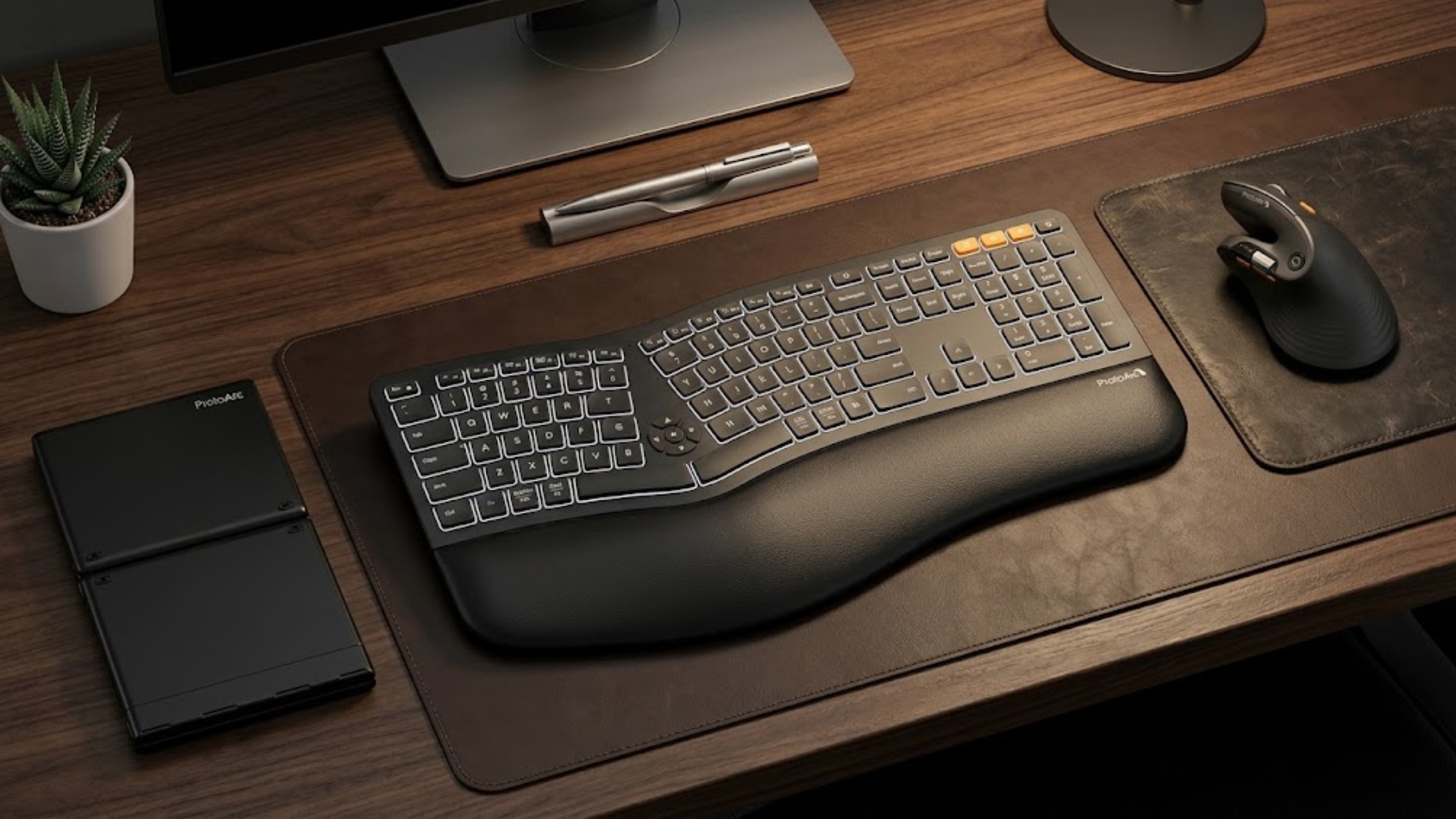
Improve workspace comfort with an ergonomic keyboard and mouse. Discover practical setup tips, wireless accessories, and Protoarc US products for everyday productivity.
Do your wrists feel uncomfortable after hours of typing or clicking? Additionally, does your neck feel tense after long computer sessions? These problems can make everyday work frustrating, especially when you answer emails, write reports, or manage projects for hours. Your workspace setup may contribute to these issues. For example, an unsuitable keyboard, poorly positioned mouse, or awkward sitting posture can increase physical strain. Fortunately, you can make your desk more comfortable with a few practical adjustments. Moreover, choosing the right Ergonomic Keyboard and Mouse from Protoarc US can help you create a more comfortable workspace. Combined with healthy work habits, these accessories can support a more natural working position. Let's explore how you can improve your setup without sacrificing productivity.
Common Workspace Problems That Affect Comfort
A comfortable workspace improves concentration and helps you work more efficiently. However, standard computer accessories may not meet every user's needs.
1. Wrist Discomfort During Long Typing Sessions
Traditional keyboards may encourage awkward wrist positions for some users. Additionally, repeated typing may cause discomfort, especially when you bend your wrists frequently. Resting your wrists against a hard desk edge may also increase pressure. Therefore, evaluate your keyboard height and hand position before purchasing new equipment.
2. Shoulder Tension From Reaching for Your Mouse
A mouse positioned too far away may force you to reach repeatedly. Consequently, these movements may increase tension in your shoulder and upper arm. Additionally, a mouse that feels too small or large may affect grip comfort. Therefore, choose a suitable design to make navigation feel more natural.
3. Desk Clutter and Limited Workspace
Multiple cables can make your desk look untidy. Additionally, they can limit how you arrange your keyboard, mouse, and other accessories. A crowded workspace can become frustrating when you switch between tasks. Therefore, wireless accessories offer a practical way to reduce cable clutter.
4. Fatigue During Extended Computer Use
Long periods of computer work can leave you feeling physically tired. Additionally, repetitive movements, limited breaks, and poor posture may contribute to discomfort. However, accessories alone cannot eliminate every workplace problem. Your sitting position, screen height, activity levels, and work habits also matter.
Why Does Your Computer Setup Feel Uncomfortable?
First, identify the causes to choose practical improvements instead of buying unnecessary accessories.
Poor Keyboard and Mouse Positioning
Your keyboard should let your shoulders relax and your elbows rest comfortably near your body. Additionally, keep your wrists relatively straight while typing. Meanwhile, position your mouse close to your keyboard. This arrangement reduces unnecessary reaching during everyday computer tasks.
Repetitive Movements Without Enough Breaks
Typing and clicking require repeated movements throughout the day. However, working continuously without changing positions may increase discomfort. Therefore, take short breaks to move and relax your hands. Additionally, move regularly to interrupt prolonged sitting.
Equipment That Does Not Match Your Needs
Keyboard layouts, key spacing, mouse shapes, and connection options vary considerably. Therefore, one design may suit one person but feel uncomfortable to another. Consequently, consider your work routine, desk dimensions, hand size, and personal preferences before upgrading.
Practical Ways to Improve Your Workspace Comfort
You can improve your workspace comfort without completely redesigning your office. Instead, start with these simple, practical adjustments.
1. Adjust Your Chair, Desk, and Screen
First, adjust your chair height so your feet rest comfortably on the floor. Also, keep your shoulders relaxed and your elbows close to your body. Next, position your screen approximately an arm's length away for comfortable viewing. However, adjust the distance whenever necessary to ensure comfortable reading. Ideally, keep the top of your screen around eye level. These adjustments help you maintain a more comfortable working posture. Additionally, Protoarc US offers ergonomic accessories that can complement your workspace setup. Consider exploring its products to support a more comfortable and organized work environment.
2. Keep Your Wrists in a Neutral Position
First, avoid bending your wrists sharply upward, downward, or sideways while typing. Instead, adjust your keyboard height to maintain a more natural wrist position. Additionally, use a suitable wrist rest for comfort during typing breaks. However, avoid pressing your wrists against the rest while actively typing.
3. Choose a Mouse That Fits Your Hand
First, choose a mouse that feels comfortable during everyday movements. Also, consider its size, shape, button placement, and tracking performance. Next, keep the mouse close to prevent unnecessary reaching. Additionally, adjust the pointer speed to reduce unnecessary hand movements.
4. Take Regular Movement Breaks
First, stand up, stretch gently, or walk briefly throughout your workday. Additionally, take short, frequent movement breaks to interrupt prolonged sitting. Whenever your schedule allows, alternate between different tasks. For example, switch between typing, reading, meetings, and other responsibilities.
5. Reduce Unnecessary Desk Cables
Wireless accessories can simplify your desk arrangement. Moreover, they make repositioning your keyboard and mouse easier. Before purchasing, check device compatibility, battery requirements, and available workspace. Also, consider whether Bluetooth or a wireless USB receiver better suits your devices.
How an Ergonomic Keyboard and Mouse Can Help
An Ergonomic Keyboard and Mouse combination can provide a more comfortable alternative to conventional peripherals. Depending on their design, these accessories may support natural hand positions and reduce awkward reaching. For example, some ergonomic keyboards feature split layouts, curved designs, or angled key sections. These features can accommodate users who prefer different typing positions. However, ergonomic designs vary, so no single layout suits everyone. Instead, comfort depends on your anatomy, typing habits, and workstation arrangement. Additionally, a Wireless Ergonomic Keyboard offers greater flexibility by eliminating the need for a direct keyboard cable. This feature lets you arrange your desk freely while keeping your workspace organized. Before choosing a keyboard, evaluate key spacing, typing feel, and layout familiarity. Also, check connectivity, battery life, and compatibility with your computer or tablet.
Exploring Protoarc US for Workspace Upgrades
When comparing computer accessories, consider Protoarc US as one brand worth exploring. Its product range includes computer peripherals that support everyday productivity and workspace convenience. Moreover, evaluate ProtoArc Products based on your actual working habits. For example, a wireless keyboard and compatible mouse can create a cleaner desk. Next, review each product's specifications before making your decision. Check the keyboard layout, mouse design, supported operating systems, connectivity, and power requirements. Additionally, decide whether you prefer a compact keyboard or a full-size layout. Compact models save desk space, while full-size keyboards may include a dedicated number pad. Ultimately, prioritize comfort and practical functionality instead of choosing accessories based solely on appearance. This approach helps you select equipment that supports your everyday tasks.
Benefits of Upgrading Your Computer Accessories
The right equipment can make your workspace easier to organize and use. However, results depend on your setup and personal preferences.
Here are several benefits worth considering:
- Improved positioning: Suitable keyboard and mouse designs may help you maintain more comfortable hand positions.
- Greater desk flexibility: Additionally, wireless connections let you arrange compatible devices more freely.
- Reduced cable clutter: Moreover, fewer cables help you maintain a cleaner, more organized workspace.
- Convenient daily use: Responsive keys and comfortable mouse controls can also support everyday productivity.
- Personalized workspace: Finally, different layouts and designs let you choose accessories that match your preferences.
However, upgrading your peripherals works best alongside proper workstation adjustments and regular movement. If discomfort persists, seek professional advice instead of relying solely on new equipment.
Conclusion: Build a Workspace That Works for You
A comfortable workspace requires suitable equipment, sensible positioning, and consistent work habits. First, adjust your chair, keep your mouse nearby, and take regular movement breaks. If your current accessories feel awkward, compare an Ergonomic Keyboard and Mouse combination with your existing setup. Additionally, consider a Wireless Ergonomic Keyboard to simplify your desk arrangement. Next, explore Protoarc US to compare available options and find suitable features. Before deciding, review product specifications carefully to ensure they meet your needs. Ultimately, choose workspace upgrades that improve everyday convenience without adding unnecessary complexity. Start with small adjustments, identify comfortable positions, and invest in accessories that support your routine.
live smarter
Shop smarter, live better, and stay ahead of the trends with our reliable recommendations!





trending
Life Style
7 min read
How to Choose Heavy-Duty Clothing That Withstands Tough Workdays
Technology
7 min read
How to Diagnose Common Car Problems with the Right Automotive Diagnostic Tools
Sport
8 min read
How to Choose Boxing and MMA Gear for Safer, More Effective Training
Food
5 min read
How to Brew Coffee Like a Barista at Home Without Overcomplicating It
Health
5 min read
Purified Water vs Spring Water: Which One Is Actually Better for Your Health?
Travel
6 min read